To commit Auto-Align 2 ARA Pro Tools:
1. Select the aligned tracks in the Edit Window. (Select the first track and use Shift+Click for a range, or Cmd+Click [Mac] / Ctrl+Click [Win] to select specific non-adjacent tracks).
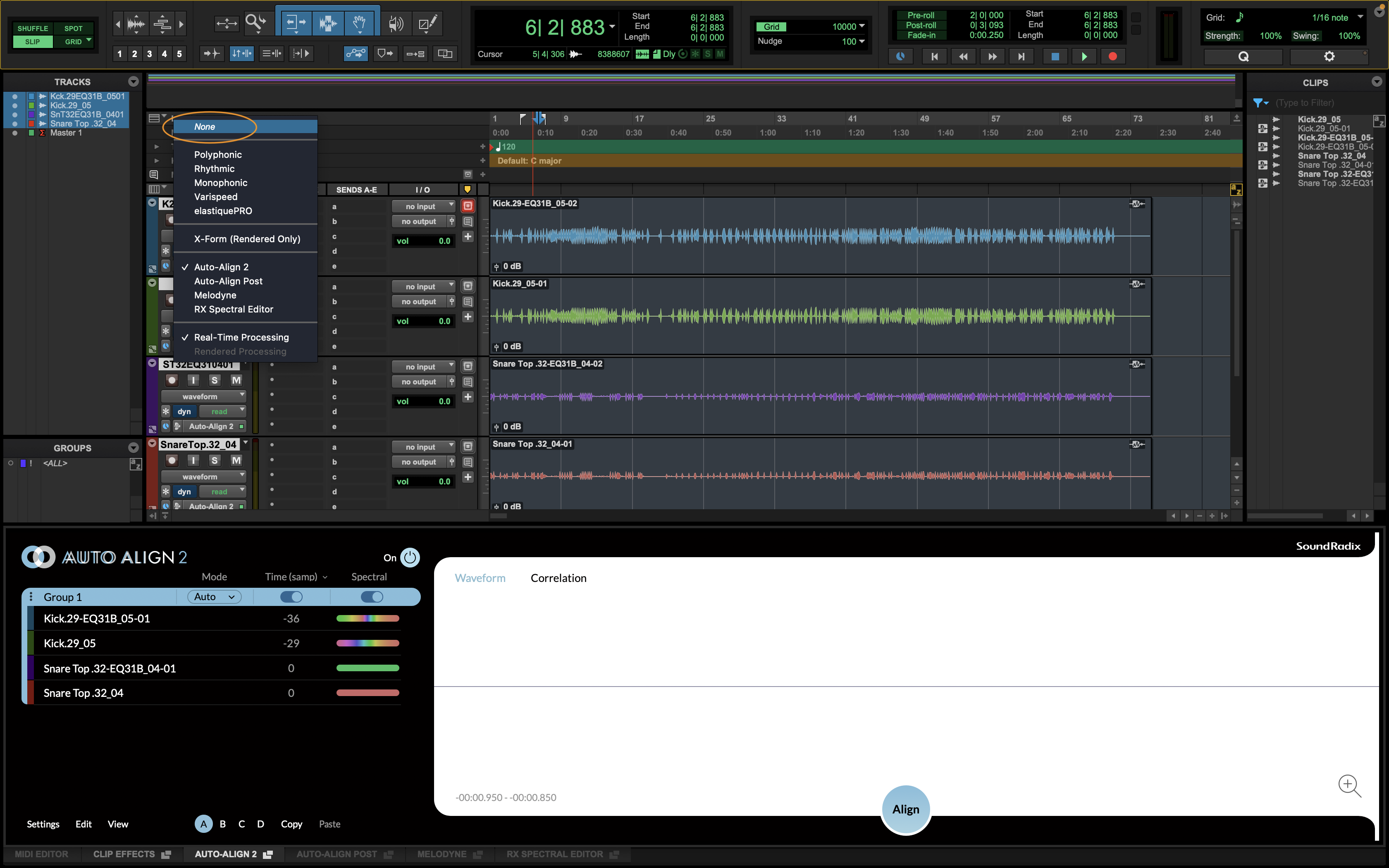
2. Hold Option/Alt' + Shift, and from one of the tracks’ ARA plug-in selector, choose 'None' and then select 'Commit'.
If you have any questions or if there's anything else I may help you with, just let me know.
Thanks,
Oran
1. Select the aligned tracks in the Edit Window. (Select the first track and use Shift+Click for a range, or Cmd+Click [Mac] / Ctrl+Click [Win] to select specific non-adjacent tracks).
2. Hold Option/Alt' + Shift, and from one of the tracks’ ARA plug-in selector, choose 'None' and then select 'Commit'.
If you have any questions or if there's anything else I may help you with, just let me know.
Thanks,
Oran
Was this article helpful?
That’s Great!
Thank you for your feedback
Sorry! We couldn't be helpful
Thank you for your feedback
Feedback sent
We appreciate your effort and will try to fix the article